E-Commerce Strategies
The holiday season is a peak period for online sales, but competition is fierce. Optimizing your Amazon listings can make or break your success. Here’s a quick rundown of what you need to know:
Why It Matters: Holiday shoppers are on the hunt for deals and gifts, with mobile users making up nearly 50% of traffic. Clear, engaging listings are essential to stand out.
Key Strategies:
Keyword Research: Focus on seasonal terms like "Black Friday deals" or "Christmas gift ideas."
Images: Use high-quality, holiday-themed visuals to grab attention.
Pricing: Adjust for peak demand while protecting margins. Bundle deals and "free shipping" offers work well.
A+ Content: Add festive touches to your enhanced content and Brand Store to create a stronger connection with shoppers.
PPC Campaigns: Use targeted keywords, dynamic bidding, and dayparting to maximize ad performance.
Timeline: Start prepping at least 12 weeks before the holidays for keyword updates, new images, and A/B testing.
Holiday shoppers spend billions in November and December, so early preparation and attention to detail are crucial for driving sales. Follow these steps to improve visibility, boost conversions, and make the most of the season.
Holiday Creative Optimizations for Amazon – VENDO Podcast Ep 72
Planning Your Holiday Sales Strategy
12-Week Amazon Holiday Listing Optimization Timeline
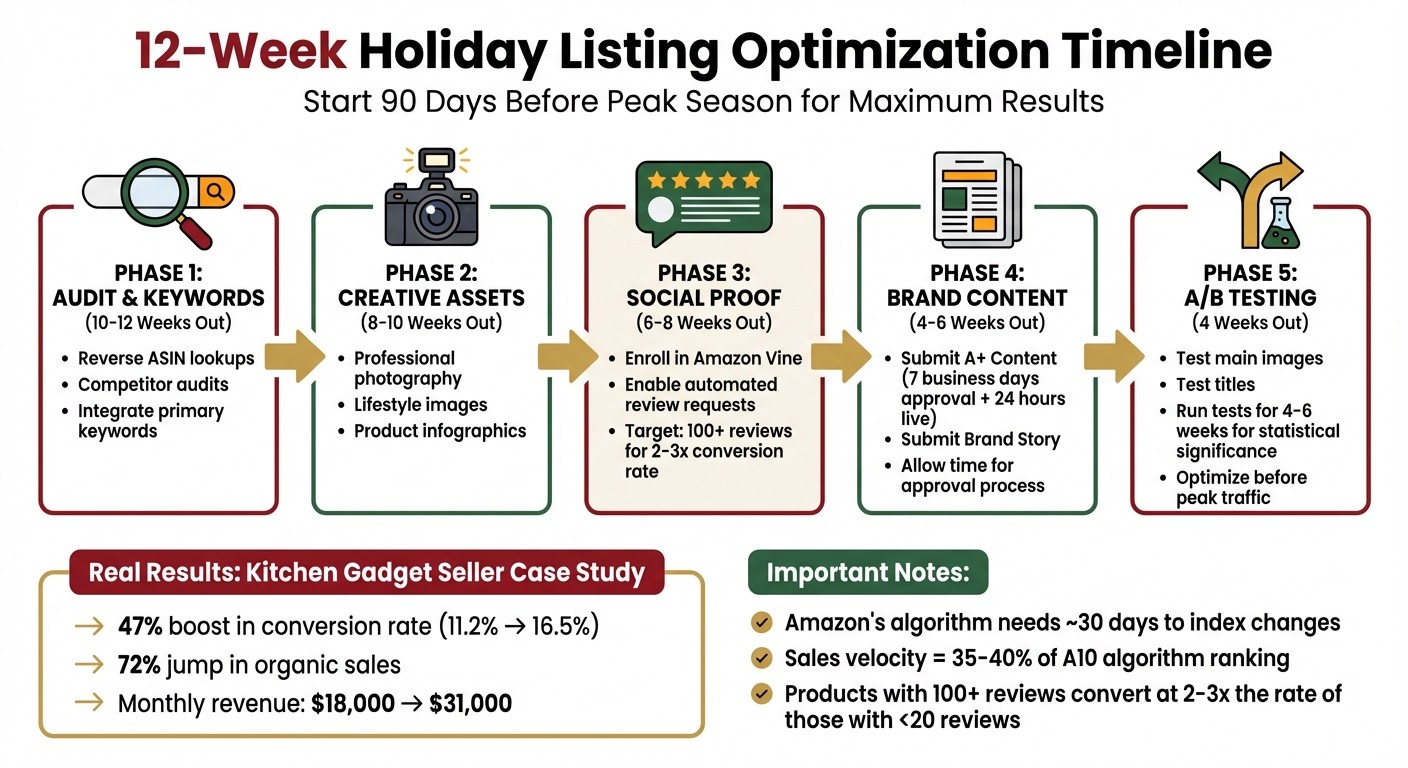
When it comes to holiday sales, timing and preparation are everything. Success hinges on starting early, giving Amazon's algorithm enough time to recognize your optimized listings and ensuring shoppers find your products during their research phase. This process - covering keyword research, professional photography, review generation, and A+ Content creation - takes around 90 days to show results in organic sales and rankings.
Holiday Sales Timeline and Key Dates
A structured timeline is essential to navigate Amazon’s approval processes and algorithm indexing. For example, A+ Content requires 7 business days for approval and another 24 hours to go live. Additionally, A/B testing for titles, images, and A+ Content should be conducted over 4–6 weeks to achieve statistically significant results.
Preparation Phase | Recommended Timing | Key Activities |
|---|---|---|
Phase 1: Audit & Keywords | 10–12 Weeks Out | Perform reverse ASIN lookups, competitor audits, and integrate primary keywords |
Phase 2: Creative Assets | 8–10 Weeks Out | Develop professional photography, lifestyle images, and infographics |
Phase 3: Social Proof | 6–8 Weeks Out | Enroll in Amazon Vine and enable automated review requests |
Phase 4: Brand Content | 4–6 Weeks Out | Submit A+ Content and Brand Story; allow time for approval |
Phase 5: A/B Testing | 4 Weeks Out | Test main images and titles to improve click-through rates (CTR) before peak traffic |
Here’s a real-world example: A kitchen gadget seller followed a 12-week holiday optimization strategy in late 2025. They updated keywords (Weeks 1–2), upgraded images (Weeks 3–4), enrolled in Amazon Vine for 18 new reviews (Weeks 5–8), and created A+ Content (Weeks 9–12). The results were impressive - a 47% boost in conversion rate (from 11.2% to 16.5%) and a 72% jump in organic sales, increasing monthly revenue from $18,000 to $31,000.
This kind of detailed planning ensures your inventory and demand forecasting align with your sales goals.
Forecasting Demand and Managing Inventory
Once your timeline is set, focus on inventory management and demand forecasting. Use historical sales data to predict demand accurately, avoiding stockouts or overstocking. Stockouts, in particular, can devastate your rankings, as sales velocity accounts for 35–40% of Amazon’s A10 algorithm.
Programs like Amazon Warehousing & Distribution (AWD) can help keep inventory pre-stocked and ready for peak demand. If you’re launching new holiday products, enroll in the Amazon Vine program early to secure 15–30 initial reviews. Products with over 100 reviews typically convert at 2–3x the rate of those with fewer than 20 reviews.
By combining proactive inventory management with early competitor analysis, you’ll be well-positioned for a successful holiday season.
Starting Early to Beat Competitors
Amazon’s search engine needs about a month to index new pages and establish keyword authority, so getting a head start is critical. Shoppers often search for specific brands or products with terms like "on-sale" or "discount" well before the holidays, signaling early intent and price sensitivity.
To stay ahead, conduct quarterly audits of your competitors and search terms to validate demand and profitability. Track major holiday keywords like "Black Friday" or "Christmas" throughout the year to capture early interest. For smaller holidays, keyword tracking three months in advance should suffice. Regularly review your accounts - whether weekly or monthly - to adapt to market changes and trends.
Starting early and staying consistent gives you a significant edge in a crowded marketplace.
Holiday Keyword Research and Implementation
Once your holiday sales timeline is in place, the next step is to focus on keyword research to tap into seasonal demand. The right keywords, strategically placed, can have a big impact on your holiday sales. It all starts with understanding what shoppers are searching for and integrating those terms naturally into your listings and ad campaigns.
Finding Seasonal Keywords
Reverse ASIN research is a powerful way to uncover holiday-specific keywords. Tools like Cerebro let you analyze your competitors’ ASINs to identify the keywords driving their seasonal performance. Look for terms that experience a surge in searches around November and December. For instance, something like "candles with wooden wick" might see a noticeable spike as the gift-shopping season ramps up.
To make your research more focused, use filters like "keyword contains" to combine your product category with holiday phrases such as "Black Friday", "Christmas gift", or "stocking stuffer." Interestingly, nearly 40% of consumers start holiday shopping before Halloween, so it’s wise to begin tracking these terms at least three months in advance. Once you’ve pinpointed the right keywords, weave them naturally into your customer-facing content to maximize visibility.
Adding Keywords to Your Listings
Your holiday keywords should be integrated into your listings to complement the strategy you outlined during your planning phase. Start by front-loading your product titles with the most important keywords and attributes. Since Amazon titles are capped at 250 bytes and often get truncated in search results, placing critical details at the beginning is key. For example, a title like "Stainless Steel Coffee Maker Black Friday Deal - Free Shipping" combines the holiday name, product type, and a clear value proposition.
Use seasonal keywords naturally in bullet points and descriptions, emphasizing features like gift wrapping or seasonal uses. Don’t forget the backend "Search Terms" field in Seller Central - this is where you can add up to 250 bytes of targeted seasonal keywords to boost discoverability without cluttering the visible content. Harpreet Munjal, Founder of LoudGrowth, also suggests creating dedicated pages for holiday campaigns:
"To get success with SEO, you should create separate pages for holiday sale campaigns like; product/brand + Black Friday, Product + Cyber Monday topic (category) etc."
Make sure your holiday-optimized content is live at least a month before peak season. This gives Amazon’s algorithm enough time to index the updates and build authority. After the holidays, remove seasonal keywords from your titles but leave the core page active to maintain rankings for next year.
Using Keywords in PPC Campaigns
For PPC campaigns, align your keywords with your listings to create a cohesive shopping experience. For example, if a shopper clicks on an ad for "Nike Black Friday Deals", they should land on a page with consistent messaging. A mismatch between ad keywords and landing page content can confuse shoppers and increase bounce rates.
When you explore keywords for your Amazon PPC campaigns, divide them into two groups: branded keywords (for shoppers looking specifically for your brand during the holidays) and non-brand keywords (for broader searches like "best cooler for Christmas"). This segmentation helps you allocate your budget wisely and target different types of buyers. Additionally, accurate GTINs can increase clicks by as much as 20%, so double-check your product identifiers before launching campaigns.
If you need expert help to implement these strategies, eStore Factory offers Amazon consulting services designed to unify your listings and ads, ensuring a smooth shopping experience for your customers.
Optimizing Product Images for the Holidays
Images are just as crucial as keywords and pricing when it comes to creating a holiday listing that converts. Holiday shoppers make decisions quickly - your images either grab their attention or lose it. With November's ecommerce sales reaching $100 billion, competition is intense. High-quality, holiday-themed visuals don’t just attract clicks - they help instill the confidence shoppers need to complete their purchases, especially when buying gifts for others.
Main and Secondary Image Requirements
Your main image needs to follow Amazon's standard guidelines: a white background, no text overlays, and the product taking up at least 85% of the frame. But the secondary images? That’s where you can truly stand out during the holidays. Use these additional slots to highlight product details and features. For instance, show a coffee maker displayed on a festive counter with holiday mugs. The goal is to provide shoppers with a complete understanding of what they’re buying - critical when they’re selecting gifts for others.
Maximize the use of all available image slots. Each additional image helps reduce cart abandonment. If your product category allows, consider using 360-degree photography. This interactive feature lets shoppers view your product from every angle, offering them greater confidence in their purchase. Once you’ve covered the essentials, shift your attention to incorporating visuals that evoke the holiday spirit.
Using Holiday-Themed Images
Holiday-themed images are effective because they connect with the emotions driving seasonal purchases. Select imagery that reflects the season while staying true to your brand’s style. For example, a rustic brand might use twine and newspaper for wrapping, while a luxury brand could feature metallic accents and silver bows.
Flat lay photography is particularly effective for holiday setups. Arrange your product alongside seasonal props like ornaments or cinnamon sticks, and shoot from above to create a cohesive, inviting scene. If your product comes in various colors, try showcasing them in holiday-inspired shades like gold, silver, or deep blue instead of defaulting to the usual red and green. As Erica, Senior Director of Creative Product at soona, beautifully explains:
"The holiday season is like a big, cozy sweater for your brand – it's all capturing fun, aesthetic, and heartwarming moments."
Adding Video Content
Videos are the perfect complement to your images, creating a well-rounded holiday showcase. Short videos are especially effective during the holiday season when trust is key. Elizabeth Arens, SEO Strategy Expert at seoClarity, emphasizes this point:
"use rich media like high-quality images and videos to attract more customers."
Videos allow you to demonstrate your product in ways that static images simply can’t.
Keep your videos short and focused on scenarios that resonate with holiday shoppers. A 15-second clip showing someone unwrapping your product or using it in a festive setting can be more impactful than lengthy descriptions. Since nearly half of holiday shoppers browse on mobile devices, make sure your videos are optimized for smaller screens and load quickly to hold their attention. If you need professional help with product photography or video creation, eStore Factory offers services tailored to Amazon sellers.
Improving A+ Content and Brand Stores
A+ Content and Brand Stores give you a unique opportunity to tell your product's story during the holidays. That extra space can lead to deeper engagement. Sure, your product images grab attention, but these enhanced content sections help build the emotional connection that turns casual browsers into loyal buyers. With holiday shoppers on the hunt for gifts that feel meaningful, your A+ Content has to go beyond listing features. Instead, focus on refining your visual storytelling with seasonal A+ Content examples.
Creating A+ Content with Holiday Messaging
Your A+ Content should embrace the holiday spirit while keeping the spotlight on your product. Think background images with subtle holiday touches - but don't let them overpower your product. As Sandy_Amazon suggests:
"Use a background image to reflect the holiday theme while highlighting your brand in action. A clutter-free, clean background works best."
Instead of just listing technical details, craft a story that shows why your product makes the perfect gift. Include items with strong gifting potential in your Brand Story carousel, and showcase a range of products to encourage cross-selling. Remember to create separate versions for desktop and mobile - text that looks great on a computer screen can become unreadable on a phone without proper adjustments. By weaving a seasonal narrative, you can enhance your product’s appeal and align it with your broader holiday strategy.
Updating Brand Stores for the Season
Your Brand Store deserves a festive update too. Start with your store header - add seasonal visuals that reflect your brand's personality and holiday cheer. If you’re running holiday promotions, consider creating an "All Deals" page. Amazon’s automated version syncs directly with your store navigation and updates based on your active promotion dates. This makes it super easy for shoppers to find your best offers without digging through multiple pages.
Organize your products into holiday-friendly collections like "Gifts Under $50" or "Stocking Stuffers" to help shoppers quickly find what they need. Highlight your best-sellers and add videos to give shoppers dynamic insights into your products. Did you know that Sponsored Brands campaigns using Brand Stores as landing pages had a 23% higher average conversion rate compared to those linking to product detail pages in late 2024? By combining festive visuals, targeted keywords, and engaging content, you create a seamless holiday shopping experience.
And while visuals grab attention, don’t forget about alt text - it’s a crucial step for boosting your search visibility.
Adding Keywords to A+ Content Alt Text
Alt text doesn’t just improve accessibility; it plays a key role in search visibility. Incorporate seasonal keywords like "best holiday gift" or "Christmas stocking stuffer" to align with how shoppers search during the holidays. These keywords help search engines match your products to holiday-specific queries.
Make sure to deploy holiday-themed alt text about a month before the season kicks off. This gives search engines time to index those terms. After the holidays, keep the core optimizations intact - this ensures you maintain strong rankings for next year’s early shoppers, many of whom start searching as early as October.
Holiday Pricing and Promotion Tactics
Pricing strategies are key to turning holiday traffic into actual sales. They work hand-in-hand with your keyword, image, and content efforts. During the holidays, pricing needs to strike a balance between staying competitive and protecting your margins. With November e-commerce sales recently surpassing $100 billion, shoppers are actively looking for deals. The challenge is to attract them without cutting too deep into your profits.
Adjusting Prices During Peak Demand
Look at your past holiday sales data to set prices that are both competitive and profitable. This historical analysis can help you identify which products performed well and what margins you achieved. A clever pricing strategy is to include shipping costs in your product price to advertise "free shipping." This has become an expectation for shoppers and is a strong driver for conversions. Another tactic is bundling popular products with high-margin add-ons to cover shipping costs while boosting overall profit per sale.
Scarcity tactics, like adding "limited availability" labels, can create urgency and encourage purchases without requiring price cuts. Updating your title tags and meta descriptions with holiday-specific phrases like "Black Friday Deals" or "Free Shipping" at least a month before the season begins ensures search engines have time to index your updates. Using Product Offer schema also helps display discounts directly in search results, making your deals more visible.
Running Holiday Promotions
Once your pricing is set, tailor your promotions to maximize conversions. Avoid broad discounts that eat into your profits. Instead, focus on targeted offers - exclusive codes for VIP customers, early access for loyal shoppers, and multi-buy deals for bargain hunters. Email campaigns with urgency-driven subject lines and percentage-off offers can increase click-through rates by 61–70% during the holiday rush. Lightning Deals and time-sensitive promotions are particularly effective for categories like electronics and home goods.
When planning promotions, factor in all costs. For example, Amazon fees average around 15%, FBA fulfillment costs range from $2.50 to $6.15 per standard item, and storage fees can triple during peak months, reaching $2.40 per cubic foot between October and December. Use a revenue calculator to ensure your promotions remain profitable after accounting for these expenses. As the holiday season winds down, shift your focus to adjusting prices for the post-holiday period.
Pricing After the Holidays
Right after December 25, update your pricing to capture gift card redemptions and clear out excess stock. On Amazon, post-holiday discounts typically range from 10% to 60%, depending on the category. Electronics often see markdowns of 20% to 30%, apparel typically requires 30% to 50% cuts, and toys may need discounts as steep as 40% to 60%.
Bela Karwatowicz, Marketing Coordinator at Rebelution, emphasizes the importance of this period:
"The post-holiday discount period on Amazon is a critical window for sellers to optimize pricing strategies and boost revenue."
Shift your product messaging from "gift-giving" to themes like "self-use" or "New Year's resolutions." In January, demand often shifts toward fitness equipment and health-related products. Automated repricing tools can help you stay competitive during the high-volume gift card redemption period. Additionally, promote deep discount codes to your email subscribers and social media followers to move leftover inventory. Keeping your sales momentum strong after the holidays not only clears inventory but also helps maintain your organic rankings for the year ahead.
Setting Up PPC Campaigns for Holiday Traffic
Holiday PPC campaigns require a specialized approach to handle the surge in competition and rising costs. During these high-demand periods, ad impressions can spike by as much as 350%, making it essential to strike a balance between aggressive bidding and efficient budget management. These strategies work hand-in-hand with your holiday listing optimizations, ensuring every aspect of your campaign contributes to boosting conversions.
Budget Planning and Dynamic Bidding
Set aside a specific holiday budget to account for the inevitable rise in CPCs. Dive into your historical data to pinpoint products that performed well in past holiday seasons, and allocate more resources to these proven winners.
For bidding, Dynamic Bidding – Up and Down is a strong choice for scaling aggressively during the holidays. This feature allows Amazon to increase your bids by up to 100% for placements likely to convert while scaling back when conversion chances are low. Alternatively, Dynamic Bidding - Down Only helps conserve your budget by reducing bids during periods of high traffic but low intent. Consider applying placement multipliers - up to 900% - for premium spots like "Top of Search (First Page)" during peak shopping days such as Black Friday and Cyber Monday. These placements, though costly, often yield higher conversion rates.
Controlling Rising Cost-Per-Click
To keep CPCs in check, refine your negative keyword list to filter out searches that don’t convert. This step alone can help reduce wasted spending. Use exact and phrase match keywords instead of broad match to avoid irrelevant traffic. Focus on long-tail keywords like "gift guide for teenage sons" to attract high-intent shoppers at a lower CPC compared to generic terms like "gifts for teens."
Paid Media Expert Ayesha Renyard highlights the importance of clarity in your messaging during this period:
"Holiday shopping is a no-nonsense mission. People will be scanning the SERPs for headlines that are clearly relevant to their search."
Monitor your keyword performance daily, especially during peak weeks. Lower bids on underperforming keywords and redirect that budget toward high-converting seasonal terms. Incorporate countdown widgets in your ad copy to create urgency - these tools tap into "fear of missing out" and can lift click-through rates without increasing your spend. Highlight specific perks like "free shipping" or "25% off" in your headlines to grab attention and stand out in crowded search results.
Once your cost controls are in place, focus on aligning your ad timing and audience targeting to maximize conversions.
Timing Ads and Targeting Audiences
Dayparting is a powerful tool that allows you to schedule ads to run during hours when your conversion rates are historically the highest. Analyze past holiday data to identify these peak times and concentrate your budget during those windows. This strategy ensures you’re spending efficiently by avoiding low-conversion periods when shoppers are just browsing. On peak shopping days, increase daily budgets to maintain visibility during high-traffic hours.
Adjust your targeting to focus on gift-givers - friends, family, and partners who may not be familiar with your product category. Use gift-oriented keywords like "gift ideas for mom", "stocking stuffer ideas", or "holiday gift guide" to capture their attention. Tailor your ads to specific shopper motivations - whether they’re looking for convenience, value, or luxury. Proper audience segmentation can drive revenue growth by up to 760%.
Finally, leverage remarketing lists on platforms like Google and Facebook to re-engage undecided shoppers and those who’ve abandoned their carts. With approximately 82% of consumers likely to act on recommendations from influencers or trusted sources during the holidays, this tactic can help seal the deal as the shopping deadline nears.
Conclusion: Preparing for Holiday Sales Success
Getting ready for holiday sales isn’t just a one-time effort - it’s a process that begins months in advance and continues well into the new year. As Elizabeth Arens from seoClarity explains:
"Ideally, you should start developing your holiday content at least two to three months before the holiday season."
To make the most of this busy shopping period, update backend search terms (like "perfect gift"), use high-quality images (1,000+ pixels for zoom), and activate coupons to create urgency. With November e-commerce sales recently surpassing $100 billion for the first time and nearly half of holiday shoppers browsing on mobile devices, it’s essential to optimize your listings for speed, clarity, and conversions. These steps not only help you capture more holiday sales but also strengthen your search authority for the future.
After the holiday season, keep the momentum going by leaving holiday URLs live all year. Even if items are marked "out of stock" or "sale ended", maintaining these pages preserves their ranking power for next year. Regularly monitor Amazon Analytics to tweak pricing and imagery, and respond to negative reviews within 24 hours to maintain customer trust.
As Flxpoint aptly puts it, "You can't sell what your customers can't find." Use structured data to highlight offers, sync inventory across platforms like TikTok and Instagram, and clearly communicate shipping deadlines. The key is to start early, stay flexible, and let data guide your decisions.
FAQs
Which holiday keywords should I prioritize?
If you want to draw in more customers during the holiday rush, zero in on holiday-specific keywords that tie directly to the season or event. Think of terms like "Christmas," "Holiday," "Christmas gift," "Winter sale," "Black Friday," "Cyber Monday," "New Year," and "Valentine's Day."
Incorporate these keywords into your product titles, descriptions, and backend search terms. This simple strategy can help your products stand out, making it easier for shoppers to find what they’re looking for and ultimately boosting your sales.
How can I create holiday images without breaking Amazon rules?
To make sure your holiday images align with Amazon's guidelines, stick to a clean, white background and showcase the product clearly. Skip any decorative elements like holiday-themed graphics, promotional overlays, or misleading text unless Amazon explicitly allows them. Prioritize high-quality, accurate representations of your product. You might also want to test different variations to find what resonates best with customers, all while staying within Amazon’s image standards.
What’s the safest way to discount without losing profit?
The best way to offer discounts without eating into your profits is to run targeted, time-sensitive promotions. Think exclusive holiday sales, free shipping offers, or bundle deals. These types of discounts can nudge customers toward spending more, boosting your average order value while keeping your margins intact.
Make sure to crunch the numbers first - understanding your costs is key to ensuring discounts don’t cut too deeply into your bottom line. Focus on applying discounts strategically, like clearing out slow-moving inventory or capitalizing on peak sales periods. This way, you can drive sales without putting overall profitability at risk.